It watches the agents you already use
OpenCode gets a plugin, so capture is live. Claude Code, Codex, Cursor and Gemini CLI are read from their own session files — nothing is installed into them.
Roam
Now on Windows 10 and 11Roam saves your coding-agent sessions to a private Git repo you control, so you can search the work and continue it on another machine or with another agent.
2.5.0 · Windows 10/11 x64 · no Roam account or cloud; a private Git remote is required
Drag, scroll or use the arrow keys. Click a screen twice to open it full size.
Resume. Pulls your newest notes and hands the agent your last session: what you asked, the files it touched, the open todos and the full transcript.
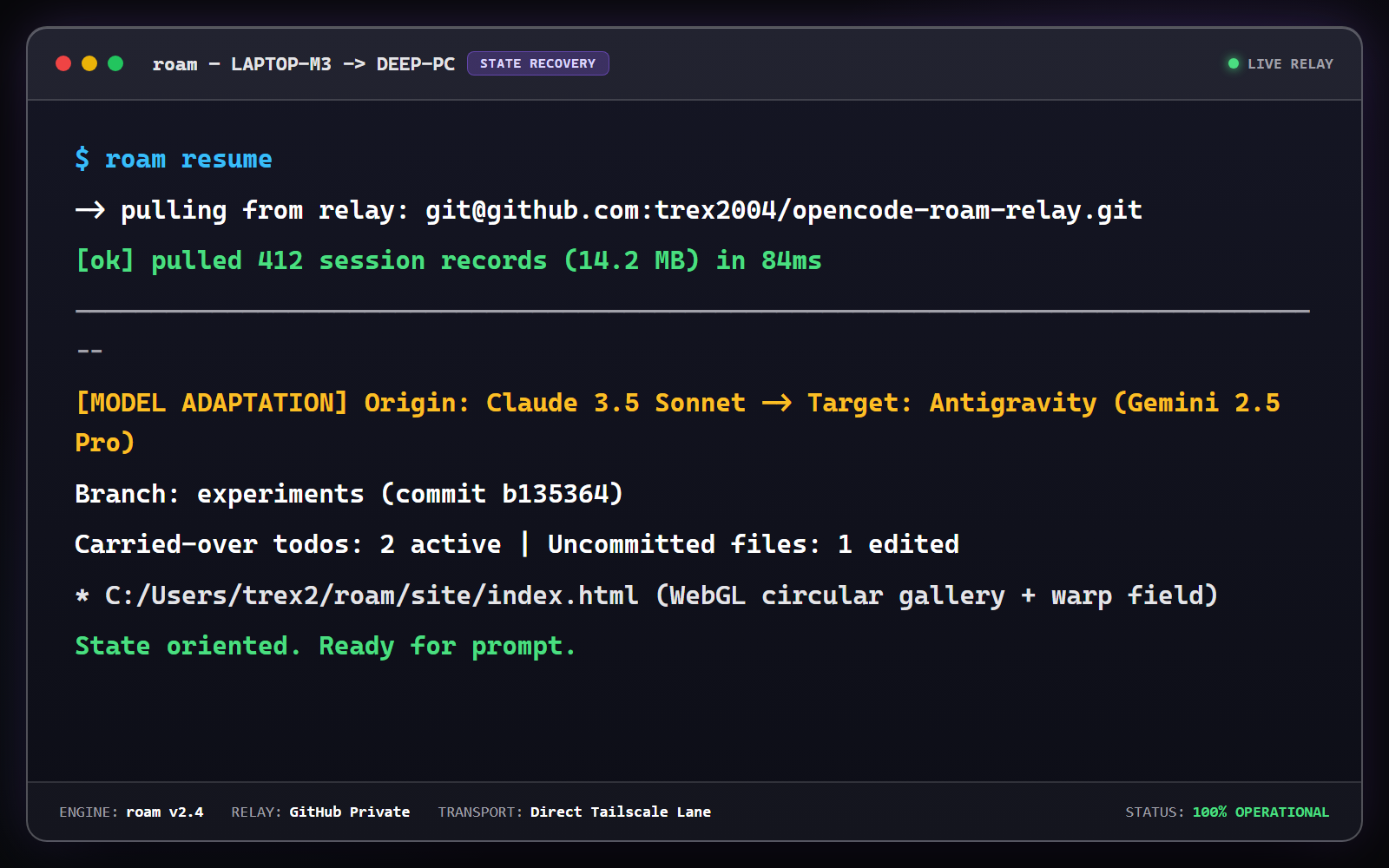
Resume. Pulls your newest notes and hands the agent your last session: what you asked, the files it touched, the open todos and the full transcript.
Then it is quiet. Roam sits in the background and writes a note after each session — you never run it by hand.
OpenCode gets a plugin, so capture is live. Claude Code, Codex, Cursor and Gemini CLI are read from their own session files — nothing is installed into them.
Each capture is a readable section in a per-project diary: what you asked, what changed, which files, which words you would search for later.
A private remote you choose — GitHub, GitLab, Gitea, or a bare SSH repo — is the source of truth. Two trusted machines online also pull from each other.
roam rules push stores your .cursorrules, CLAUDE.md and AGENTS.md in the relay; roam rules pull merges them into another workstation with idempotent markers, so every agent follows the same rules.
Step away from your desk and dictate notes. Local offline speech-to-text transcribes your voice into immediate action items and context for your next coding session.
Chrome and Edge extension embeds a Send to Roam button directly into ChatGPT, Claude.ai, and DeepSeek — streaming browser conversations directly into local agent memory.
Every captured session on every machine is searchable by the words you remember. Pro adds offline semantic ranking, computed on your machine, so a session can still turn up when the exact words differ.
One readable section per session, in a per-project diary.
The question, the files that moved, the commands that ran.
Find a session by a word you remember — the error, the file, the thing you asked for.
“...retry the websocket timeout with exponential backoff...”
Takes a snapshot whenever your agent stops typing.
Two trusted machines sync straight to each other, no server in between.
An 8-character code and pinned fingerprints link two machines.
Plain markdown in a repo you own. No export step, no lock-in.
Roam has no account or cloud service. Session text is pushed to your configured remote; use a private repo and scoped credentials. Credential filtering is best-effort, and encryption is optional. Read the privacy answers.
A single ₹1,499 payment unlocks Pro for six months. There is no automatic renewal. After it expires, local capture and search stay free; Pro features need a valid key.
Complete local session memory and developer tooling for one workstation
roam rules push / pull keeps .cursorrules, CLAUDE.md and AGENTS.md the same on every machine.roam sniffer) Labs: Auto-captures terminal command crashes & exit errors into active agent context.Everything that connects your machines, plus semantic search, voice and the encrypted vault
Items marked Labs are included with Pro but are experimental: they work today and may change. roam labs lists them.
roam tunnel): machines on the same Tailscale network fetch from each other directly instead of waiting on GitHub. Needs Tailscale on both.roam send): a signed message lands in that machine's inbox for its agent or roam daemon to pick up.roam voice, roam speak) Labs: Windows' offline speech recognition turns an audio note into todos; Kokoro reads your handoff aloud (the Windows voice if Kokoro is not installed).roam channel) Labs: Telegram & Discord intake bots beaming mobile voice notes & tasks to agent queue.roam daemon) Labs: works through the tasks your other machines send to this one.roam pr) & Token Velocity Stats (roam stats) Labs: a PR description drafted from your session notes, and sessions, prompts and estimated tokens per agent, project and day.roam crypto): session text is encrypted with AES-256-GCM on your machine before it reaches the relay; keywords stay searchable.If something here is unclear, that is a bug in the page. Tell us through the Contact link at the bottom.
roam rules push in a workspace and Roam stores its .cursorrules, CLAUDE.md and AGENTS.md in your private relay. On another machine, roam rules pull merges them in with idempotent markers, so running it twice changes nothing. It runs when you ask; it does not watch files.Win + Shift + R search palette is planned. Today, search with roam search in a terminal, or ask your agent: it has a roam_search tool.roam pair-request and shows an eight-character code — single use, fifteen minutes. On a machine you already trust, roam pair-approve --code XXXX-XXXX puts both fingerprints on screen to compare, binds the new device into your allowed senders, and pins its key. That machine trusts the approver back on its next read, from the same receipt — so the code is the only thing you ever carry between the two. roam pair-remove <device> takes it back out.roam tunnel up also opens a direct lane over Tailscale between two trusted machines that are online, and fetches from the peer — a hop between your machines instead of a round trip through the internet. If the lane is missing or drops, everything falls back to git, so a drop costs latency and never data. Pushes always go to origin.roam send delivers a task; on the target machine a small inbox watcher wakes a headless agent worker with its own tools, which performs the task, replies with the result, and acknowledges only once it is done. It is off by default, accepts mail only from senders you pinned, runs one worker at a time under a daily spawn cap and a hard timeout, and parks a task after three failed attempts instead of dropping it.roam send and the background worker, trust and revoke between machines, the encrypted vault, semantic search ranking, voice memos and spoken briefings, Telegram and Discord intake, PR summaries and usage stats. One ₹1,499 payment grants six months of Pro access; after expiry, local capture and search remain free while Pro features are gated. A key is emailed after receipt review and checked locally.%LOCALAPPDATA%\Programs\Roam, a Start Menu entry, an entry in Apps & features, a capture plugin for plugin-capable agents, and a per-user autostart entry that runs the watcher at logon. Uninstall removes all of it — and deliberately leaves your repo and your device key alone.AES-256-GCM envelope encryption (roam crypto). The encryption key is generated on your machine; the relay only ever holds copies of it wrapped for your passphrase or your paired devices. A secret scrubber redacts common credential shapes (API keys, tokens, database URLs, passwords) before anything is saved; it is best-effort, so keep secrets out of chats. Messages between paired machines are signed with pinned ed25519 device keys; the optional peer lane runs over Tailscale, which encrypts it.Roam for Windows
2.5.0 · one installer, one private repo, guided setup.
roam_search now reads the same local index as the CLI instead of re-reading every session on every call. Measured on a 4.8 GB relay: 90 s down to 1–3 s for a word that matches nothing, 145 s down to about 8 s for a very common one. Results are unchanged.roam daemon runs commands sent from the same machine again, and no longer deletes messages between two agents on one machine.roam inbox --ack) no longer ends in “commit failed” on a machine that never quarantined a message.--fresh to pull first; Roam tells you when the local copy is more than 5 minutes old.roam --help: they work, but may change.roam resume --voice and standalone roam speak running entirely offline on CPU via ONNX..cursorrules, CLAUDE.md, and AGENTS.md with idempotent merge markers.roam daemon): Dedicated background executor for asynchronous agent workflows.Encountered a bug, crash, or sync issue? Describe it below, attach logs or screenshots, and we will receive it at official.supercube@gmail.com.